Custom Assistants
Kagi Assistant’s Custom Assistants allow you to create specialized LLM personalities tailored to your specific needs, preferences, and use cases.
Creating a Custom Assistant
- Navigate to Assistant settings -> Custom Assistants
- Click Add New.
- Configure your assistant with these settings:
- Assistant Name: Give your assistant a memorable name
- Custom Bang Name: Create a shortcut to quickly access this assistant
- Internet Access: Toggle to allow access to Kagi Search results
- Lens: Choose a specific lens to focus searches on particular domains
- Personalized Results: Enable to apply your search customizations
- Model: Select your preferred LLM model based on:
- Speed
- Quality
- Cost
- Context Window
- Response Instructions: Define how your assistant should interact (20,000 characters max)
Tips for Effective Instructions
- Be specific about desired tone and style
- Include relevant expertise areas
- Specify preferred response format
- Use positive instructions ("provide examples" rather than "don't be vague")
- Consider including:
- Preferred citation style
- Response length preferences
- Specific areas of focus
- Format requirements
- Language level (technical, casual, academic)
Best Practices
- Test your assistant with various prompts
- Refine instructions based on responses
- Create different assistants for distinct use cases
- Use clear, actionable language in instructions
- Update settings as your needs change
Remember that well-crafted instructions lead to more accurate and useful responses. Take time to think about your specific needs and how to communicate them effectively.
Using Custom Assistants
Select your Custom Assistant from the model-selection dropdown menu below the prompt bar to begin interaction.
Default Custom Assistants
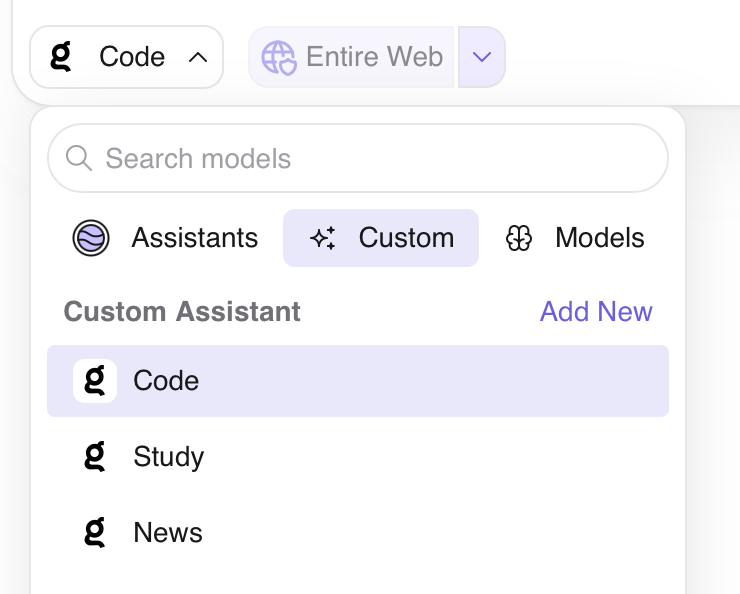
Kagi Assistant comes with carefully pre-configured assistants designed to enhance your productivity.
Code Assistant
Powered by the best AI model for programming tasks and equipped with web access, the Code Assistant excels at:
- Writing efficient, clean code
- Debugging and troubleshooting
- Providing practical coding solutions
Whether you're debugging a tricky issue, learning a new programming language, or seeking to optimize your code, the Code Assistant is your go-to programming companion.
The Code Assistant can be accessed via the !code bang or by selecting "Code" from the model dropdown to access this specialized assistant.
Study Assistant
The Study Assistant guides your learning journey through active discovery. Using the Socratic method, evidence-based learning techniques, and collaborative exploration, it helps you uncover answers rather than simply providing them.
The Study Assistant can be accessed via the !study bang, or by selecting it from the Custom assistant list.
News Assistant
Enter a news event (e.g. "apple event 2026" or "world cup results for this week"), and the News Assistant will gather information from multiple sources to provide a report on the event. It searches news sources, analyzes events, and presents structured reports with key highlights, perspectives, and timelines.
The News Assistant can be accessed via the !news bang or by selecting it from the Custom assistant list.
Example Custom Configurations
Here are a few example configurations you can use to get started. You can also visit Anthropic’s Prompt Library for more useful prompts.
Professional Writer Assistant
| Setting | Value |
|---|---|
| Name | Writing Pro |
| Bang | !write |
| Internet Access | Enabled (for current writing trends and examples) |
| Lens | Entire Internet |
| Instructions | Respond in a professional tone with clear, concise language. Focus on grammar, style, and clarity. Provide constructive feedback on writing samples. When appropriate, suggest improvements while maintaining the original message's intent. |
Coding Mentor
| Setting | Value |
|---|---|
| Name | Code Guide |
| Bang | !code |
| Internet Access | Enabled (for documentation and best practices) |
| Lens | Programming |
| Instructions | Explain programming concepts clearly with practical examples. Use best practices and modern conventions. Include comments in code examples. Focus on readability and maintainability. Highlight potential pitfalls and optimization opportunities. |
Academic Researcher
| Setting | Value |
|---|---|
| Name | Research Aid |
| Bang | !research |
| Internet Access | Enabled (for current research and papers) |
| Lens | Academic |
| Instructions | Provide comprehensive, academic-style responses with clear citations. Focus on peer-reviewed sources when available. Present balanced viewpoints on complex topics. Highlight key findings and methodologies. |
Recipe Helper
| Setting | Value |
|---|---|
| Name | Chef Assistant |
| Bang | !chef |
| Internet Access | Enabled (for recipes and cooking techniques) |
| Lens | Recipes |
| Instructions | Provide clear, step-by-step cooking instructions. Focus on practical cooking tips, ingredient substitutions, and technique explanations. Include serving sizes and preparation times. |
News Analyst
| Setting | Value |
|---|---|
| Name | News Guide |
| Bang | !news |
| Internet Access | Enabled (for current events) |
| Lens | World News |
| Instructions | Analyze current events with balanced perspective. Provide context for news developments. Focus on factual reporting and multiple viewpoints. Summarize key points clearly. |